Contranix: the contract lifecycle, in one platform.
From the moment a contract is drafted to the day it needs to renew, here's exactly what Contranix does at each stage, plus the AI features and the security posture behind it.
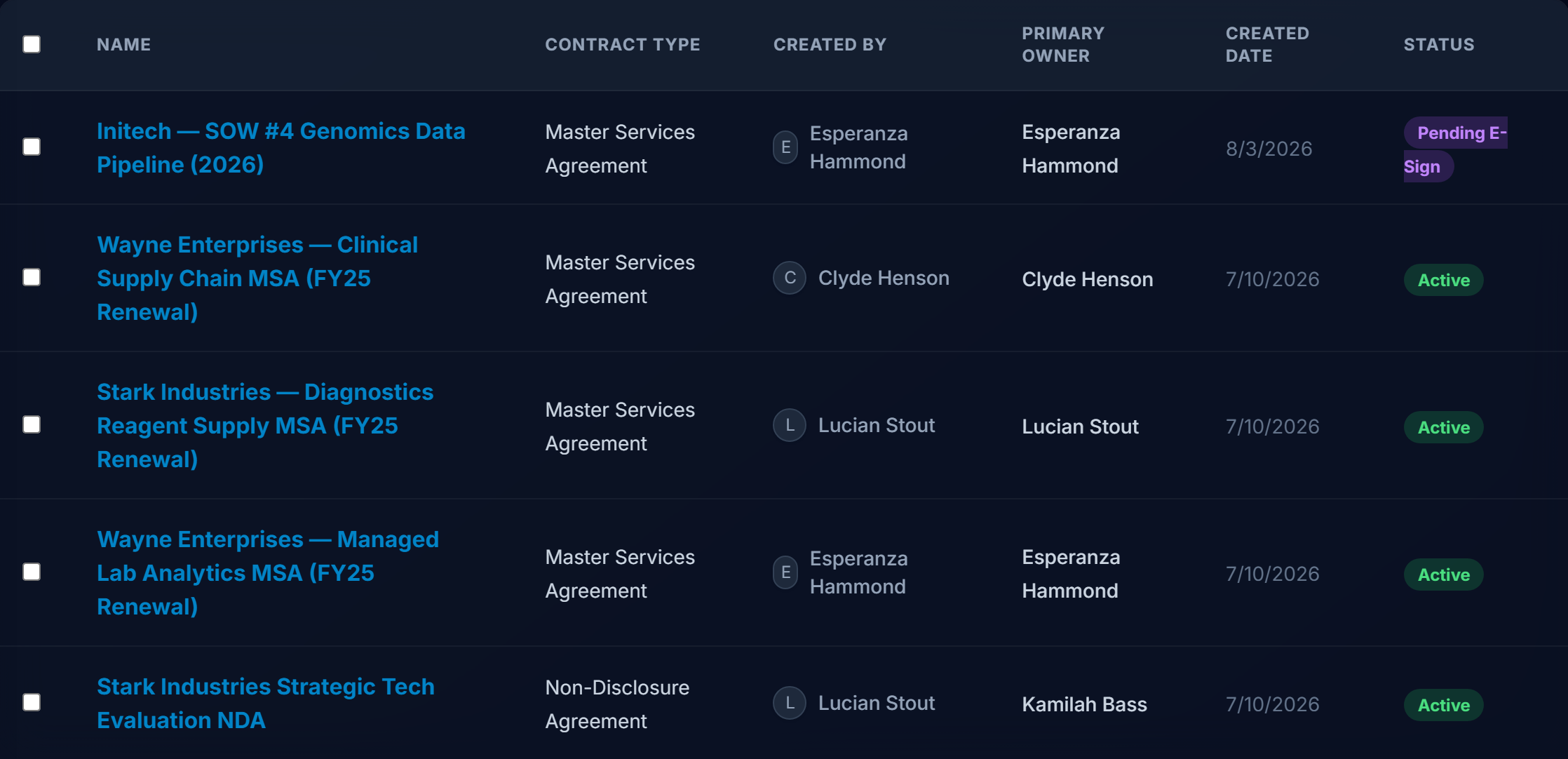
Contract Lifecycle & Repository
Every agreement lives in a searchable, filterable repository from creation through execution and beyond. Contracts move through defined statuses (draft, in review, pending approval, active, and so on) with a complete edit history behind every one.
- Full version history for every contract, including who changed what and when.
- Custom fields, tags, and department/contract-type filters to organize your portfolio.
- Bulk actions (status change, export, delete) for managing large sets of contracts at once.
- Counterparty records linked to every agreement they're party to.
Clause Library
Clauses are catalogued by category, risk level, jurisdiction, and department, with usage tracked every time one is inserted.
Templates & Clause Library
Maintain a single source of truth for the language your team uses. Standard templates (NDAs, MSAs, and your own contract types) let sales and legal self-serve standard paper through guided creation, while the clause library keeps approved language one click away inside the editor.
- Insert library clauses directly from the rich-text editor toolbar.
- Clauses tagged by risk level and jurisdiction so the right language is easy to find.
- Guided "quick create" forms for generating standard contract types quickly and consistently.
Approval Workflows
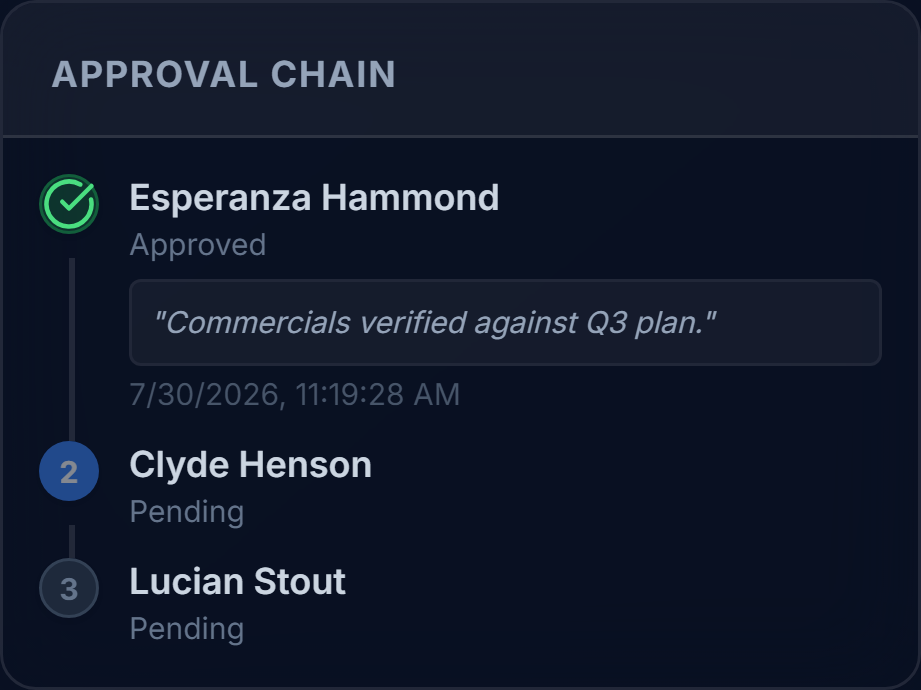
Design no-code, condition-based approval routing — for example, route to Finance automatically when a contract's value exceeds a threshold. Each step in a workflow has a single approver, moving sequentially from step to step, with escalation and delegation so approvals never get quietly stuck.
- Condition-based routing rules (e.g. by contract value, type, or department).
- Automatic escalation when a step goes unanswered, plus manual delegation to a stand-in approver.
- A "Stuck Approvals" dashboard widget that shows exactly whose desk a contract is sitting on and for how long.
Each workflow step routes to one approver at a time; multi-approver (parallel) steps are on our roadmap but not available today.
Obligation & Renewal Tracking
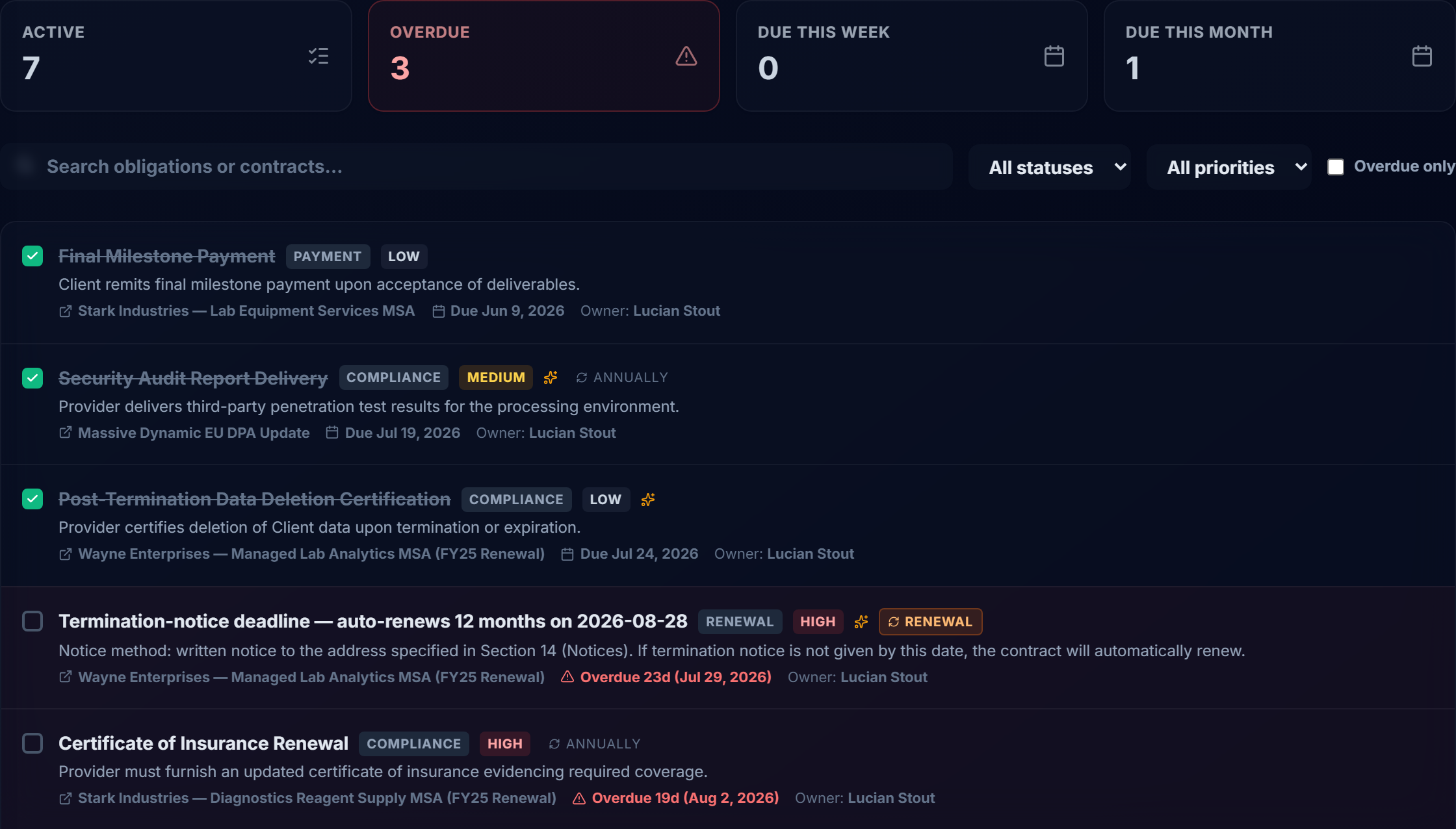
Signing a contract is rarely the end of the work. Contranix tracks what happens after: SLA commitments, compliance checkpoints, renewal deadlines. Nothing depends on someone remembering.
- Obligations captured manually or extracted from contract text with AI assistance, with due date, priority, and status.
- Automatic renewal-notice and expiry-review reminders derived from each contract's renewal terms.
- A dedicated Obligations page, a calendar view, and dashboard widgets for expiring and auto-renewing contracts.
E-Signature
Send contracts for signature without leaving Contranix. Signature placement is configured in-app, and execution is handled through your choice of e-signature provider.
DocuSign
Native integration for teams already standardized on DocuSign.
emSigner
Native integration for teams using emSigner / eMudhra.
Collaboration & Redlining
The in-app document editor supports collaborators with editable access, version history with per-author attribution, and optional real-time co-editing for teams that want to draft together.
- Add collaborators to a contract with editable access alongside the creator.
- Every save is captured as a version, with the author recorded for each one.
- Optional real-time co-editing for teams that want multiple people drafting the same document at once.
- Side-by-side version diffing to see exactly what changed between two saved versions.
AI that reads contracts the way your team does.
Every AI feature below is a separate toggle your admin turns on. None are active by default, and you choose which model provider powers them.
Reading Every Contract
Metadata Extraction
Pulls key dates, parties, contract value, and renewal terms straight out of the document text, including auto-renewal flags and notice periods.
Summarization
A plain-English summary of what a contract actually says, so reviewers don't start from a blank page.
Clause Analysis
Identifies and categorizes the clauses present in a document, flagging what's standard and what needs a closer look.
Risk Scoring
Surfaces a risk assessment for a contract based on its clauses and terms, so higher-risk agreements get prioritized attention.
Contract Review
A full AI pass over the contract highlighting issues, missing protections, and points worth negotiating.
Obligation Extraction
Pulls post-signature obligations (SLAs, compliance checkpoints, renewal notices) into a trackable list automatically.
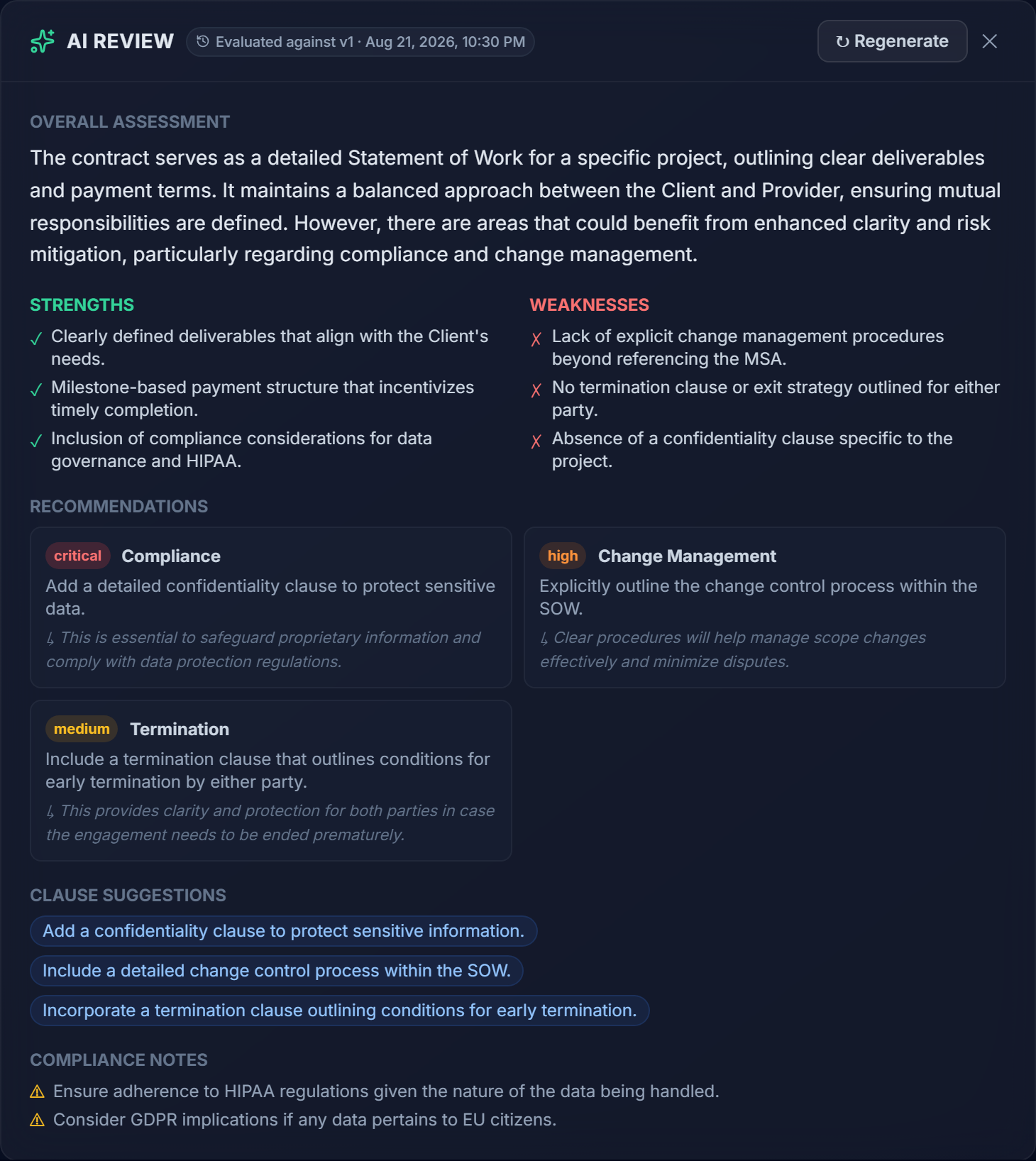
One panel, the full picture.
Every AI review returns a single structured verdict for the contract, not just a summary.
- Strengths — what the contract already gets right.
- Weaknesses — gaps and risk-bearing language worth a second look.
- Recommendations — concrete next steps to bring the contract in line.
Negotiation Intelligence
Playbook Evaluation
Legal authors negotiation playbooks with ideal, fallback, and walk-away positions for key clause types. Every contract can be checked against the applicable playbook, returning a traffic-light verdict per position — so reviewers instantly see where a contract holds the line and where it doesn't.
AI Redline Agent
The AI proposes specific edits as redline suggestions, shown side-by-side with strikethrough diffs. Review each one (accept, reject, or modify), then apply the accepted set in one action, which rewrites the contract and saves a new version.
Conflict Detection
Finds contradictory terms between a contract and other agreements in your portfolio (boosted when they share a counterparty) and explains exactly what conflicts and why, with excerpts from both documents.
Renewal Guard
Reads each contract's renewal terms and materializes the right follow-up automatically — a renewal-notice reminder timed to the notice period, or an expiry-review task when it doesn't auto-renew — surfaced on the Renewal Radar dashboard widget.
Across Your Whole Portfolio
Ask Your Portfolio
Ask natural-language questions — "how have we handled data-processing terms with this counterparty before?" — and get an answer grounded in your actual contract history, with numbered citations back to the exact source contracts and excerpted passages.
Powered by a vector search index built over your contract text, so answers are retrieved from your own agreements rather than generated from general knowledge alone.
AI Chat Assistant
A per-contract chat that has already read the contract text, its AI summary, clause analysis, risk score, and review. Full multi-session history is kept, so you can ask follow-up questions about a specific agreement without re-explaining context.
Built to be turned on deliberately, not by default.
Every capability above is gated behind its own per-company feature flag, off until an admin enables it.
Per-feature, per-company flags
Turn on exactly the AI features your team wants — nothing runs on your contracts unless it's switched on.
Model provider is configurable
Runs through a provider abstraction that supports OpenAI, Anthropic, Gemini, Azure OpenAI, or a self-hosted Ollama model.
PII redaction & prompt-injection screening
Every AI call passes through a security layer before reaching the model provider.
Version-anchored provenance
Each AI output is stamped with the document version and content hash it was evaluated against, so you can tell if a contract has changed since.
See the Security section below for more on data handling.
A straightforward account of how Contranix is built.
This section describes our current architecture as-is. We haven't pursued formal certifications yet, and we'd rather tell you exactly what's in place than round up.
Multi-Tenant Isolation
Contranix is a shared-schema, multi-tenant application: every company's data lives in the same database, separated by a required company_id on every tenant-scoped table. Every query that touches contract, user, or configuration data is required to filter by the requesting user's company — this is enforced as a coding convention across the backend, not left to individual routes to remember correctly on their own.
If you have specific tenant-isolation testing requirements as part of a security review, we're happy to walk through the architecture in more detail.
Shared schema, scoped queries
Every tenant-scoped table carries a company identifier that every query is required to filter on.
Segregated file storage
Uploaded contract files are stored in per-company, per-contract directories.
JWT authentication
Signed tokens (HS256) issued on login and refresh; every protected endpoint requires a valid token.
Role-based access control
Permissions are checked on the backend for every gated action — not just hidden in the UI.
Document-level permissions
Editing a contract's document requires being its creator or an added collaborator, and only while it's in an editable status.
Authentication & Access Control
Users sign in with email and password; Contranix issues a signed JWT that's required on every subsequent request. Role-based permissions determine what a given user can see and do — approvers, admins, and standard users get access matched to their role, and permission checks live in the backend so they can't be bypassed from the client.
Audit Logging
Actions on contracts and API requests are recorded to an audit log, and every AI call is logged separately with what was asked and what feature triggered it. Every saved edit to a contract's document is captured as a version, with the author attributed, so there's a reviewable history behind every change — not just the current state.
- Per-request audit middleware logging on the API.
- Separate AI interaction logging for every AI feature call.
- Full, attributed version history on every contract document.
AI Data Handling
AI features are off by default and only run when your admin turns them on. When they're used, calls are routed through a single internal service rather than hit directly from application code, which is what makes the following consistent across every AI feature.
PII redaction
Personally identifiable information is screened before content is sent to a model provider.
Prompt-injection detection
Contract content is screened for prompt-injection attempts before it reaches the model.
You choose the model provider
OpenAI, Anthropic, Gemini, Azure OpenAI, or a self-hosted Ollama model — configured per deployment.
Full AI interaction logging
Every AI call is logged with the feature, model, and token usage behind it.
E-Signature Handling
Signature execution itself is handled by your chosen provider — DocuSign or emSigner — through their own signing infrastructure; Contranix orchestrates the request and stores the resulting signed document and status against the contract record.
What we haven't done yet
In the interest of not overstating our maturity: we have not pursued SOC 2 or ISO certification, we do not currently support SSO (SAML/OIDC), and approval workflow steps route to one approver at a time rather than supporting parallel/multi-approver steps. These are areas we're actively evaluating.
If a specific requirement on your security questionnaire isn't addressed on this page, ask us directly — we'd rather give you an accurate answer than a vague one.
Want to see it on your own contracts?
We'll walk through the platform using examples close to what your team actually deals with.
Request a Demo